Self-hosted memory infrastructure
Long-term memory for your AI product,without the vendor lock-in.
HUPI is a drop-in gateway that gives any OpenAI-API-compatible client durable, fact-checked, and auditable memory across conversations — self-hosted, on your own Postgres, with any LLM vendor you choose.
Open source · Docker, Kubernetes & Helm ready · Bring your own Postgres
The problem
Every team building on top of LLM APIs runs into the same wall.
Memory resets every session
An AI's memory of a user normally disappears the moment a conversation ends, or gets capped by whatever fits in one context window — so your product either forgets, or pays to re-explain itself every time.
One vendor’s memory feature, one vendor’s lock-in
Bolt a memory feature onto a specific model provider and you’ve quietly tied your product’s entire history to that vendor — switching AI providers later means a data migration, not a config change.
Rolling your own inherits every hard problem at once
Building an ad hoc memory or RAG store for user data means you’re now also on the hook for encryption, multi-tenant isolation, and audit trails — from scratch, on your own timeline.
What HUPI is
Point your existing client at HUPI instead of the vendor. That's the integration.
HUPI is a small self-hosted server that speaks the standard OpenAI-compatible chat API on both sides. Change your client's base_url to point at HUPI instead of OpenAI, Anthropic, or whichever vendor you use today — nothing else in your application changes.
Underneath, HUPI enriches every turn with relevant memory before forwarding the request to whichever real LLM vendor is actually configured, and durably records the exchange afterward so future turns can draw on it.
before
after
Your client, prompts, and application code stay exactly as they are. HUPI forwards each request to the LLM vendor you've configured in providers.yaml.
See it work
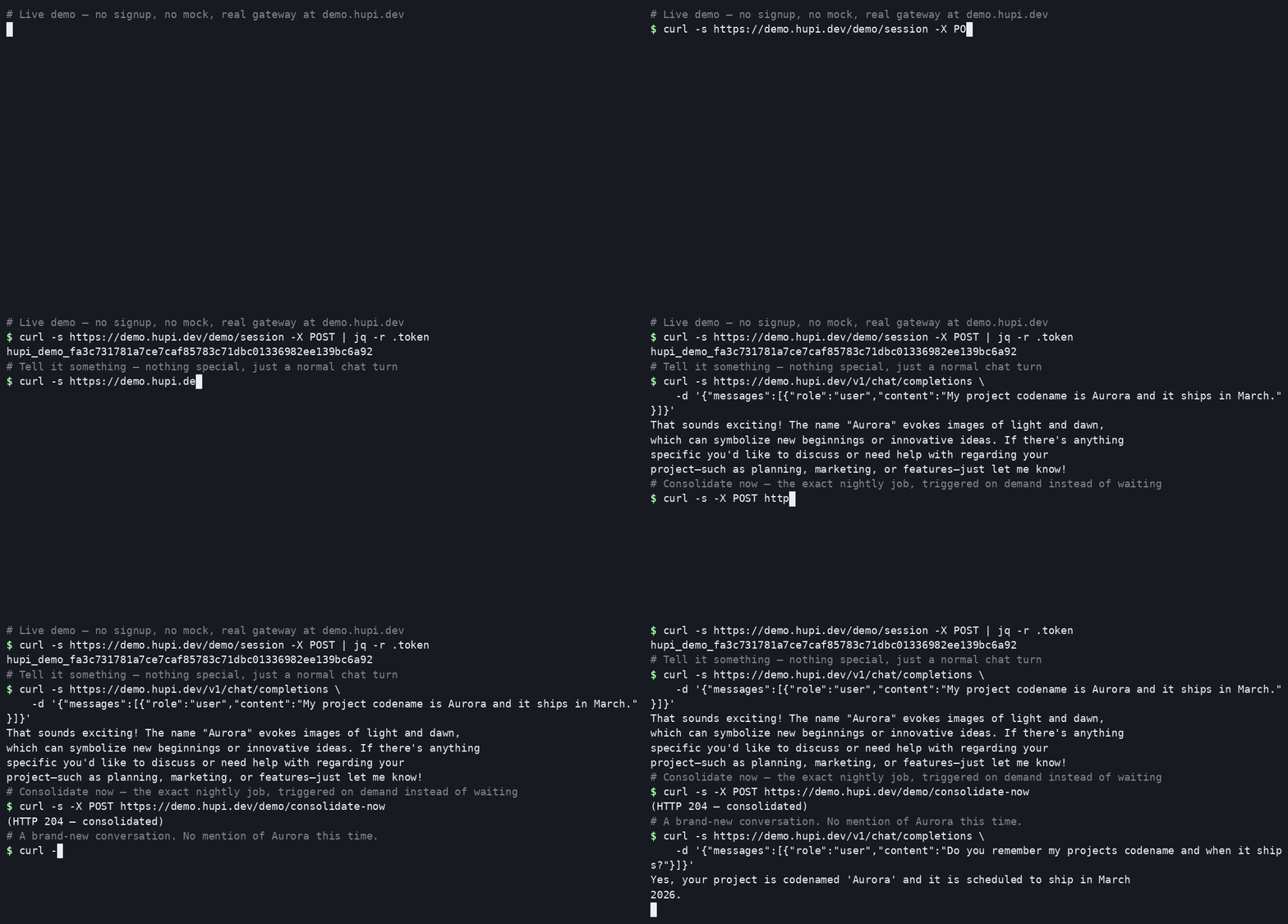
A real terminal session against a live HUPI gateway — not a mockup.
Tell it something, trigger the real consolidation pass on demand instead of waiting overnight, then start a brand-new conversation — no mention of "Aurora" in it — and watch it recall exactly what it was told.
Three pillars
What HUPI is built around.
Provider-independence
Switch from GPT to Claude to a locally hosted model — your memory doesn't move or need re-indexing beyond a one-time re-embed, because it's stored as plain decrypted text and metadata, not tied to any one vendor's format.
Integrity over convenience
Every “memory” the system asserts as fact is independently double-checked against its source text before being trusted. The system is designed to be honest about what it doesn't know, rather than confidently making things up about your own history.
Auditability
Now HUPI can tell you why a decision was taken — every answer ships with a Sources list, the exact memories it actually pulled from, right in the response. Not a guess, not an internal log you have to go dig up: a real, visible answer to "what did it remember, and from where," on every single reply.
How it works
Five steps, running quietly behind every conversation.
Click a step, or let it cycle on its own.
Capture
Every conversation turn — plus any file or image you attach, extracted to text or captioned first — is durably recorded the moment the AI replies, encrypted by default, forever, until you deliberately delete it.
In your editor
A Cursor-style chat, inline edit, and code completions for VS Code — backed by your own HUPI, not a vendor.
The HUPI VS Code extension is a plain extension built on the public VS Code API — not a fork of the editor — so it stays compatible with every VS Code release with no rebasing burden. It talks to HUPI the same way any other client does: the official OpenAI SDK, pointed at your gateway's base_url instead of a vendor's.
Every conversation you have in the sidebar, and every inline edit you accept, is captured, grounded, and retrievable the same way any other HUPI-backed conversation is — the same memory your other tools already build on.
.vscode/settings.json
{
  "hupi.baseUrl": "https://your-hupi-host",
  "hupi.model": ""
}
Run HUPI: Set API Key from the Command Palette to store your key in VS Code's secret storage — it's never written to a settings file.
Chat sidebar
A HUPI panel in the activity bar. Every message automatically includes your active file or current selection as context — ask questions about your codebase without pasting anything in.
@hupi in the Chat view
HUPI is also a chat participant in VS Code's own native Chat view — type @hupi alongside Copilot Chat or any other participant already living there. Marked sticky, so a conversation stays routed to HUPI after the first mention.
Inline edit — Ctrl+K / Cmd+K
Select some code, describe the change, and HUPI rewrites it. You get a real diff preview — original vs. proposed — before anything touches your file. Accept or reject, nothing applies silently.
Inline completions
Copilot-style ghost text as you type, powered by your own HUPI gateway — Tab to accept. Off by default (it fires on every typing pause, unlike everything else here); turn on hupi.inlineSuggestions.enabled when you want it.
Multi-file edit — Ctrl+Alt+M / Cmd+Alt+M
Pick from your open files, describe a change, and review a real diff for every file HUPI proposes — accept some, all, or none. Scoped to files you already have open, not a whole-workspace scan.
Answer citations
Now HUPI can tell you why a decision was taken. Every answer in the sidebar and @hupi comes with a Sources list underneath it — the exact summaries, entities, or past exchanges it actually pulled from, with the real text it read. On by default, free. Turn on hupi.citations.deep for one extra verification pass that marks which sources the answer actually relied on, not just what was available.
HUPI agent (preview)
Turn on hupi.agent.enabled (it's on by default in HUPI Code) and the sidebar chat can read and search your code, check problems, edit files, run commands, and use your MCP servers' tools. Each call shows as a card. Edits show a diff and commands show the exact command line, and nothing changes until you click Allow. HUPI remembers your question and the answer, never the tool output.
Memory tools for Copilot agent mode (MCP)
The extension registers your gateway's MCP server with VS Code, so its agent mode and any other MCP-aware chat can search your HUPI memory and save to it as tools. No mcp.json to write. It uses the same base URL, team and credentials as HUPI chat. Needs VS Code 1.101+.
File & image attachments
Attach a .txt/.docx/.pdf or an image to @hupi the same way you would with VS Code's own Chat view — the attach-file picker, drag-and-drop, or #file:. The real text is extracted, or a vision model captions the image, and either becomes retrievable memory you can ask about in a completely different conversation later — not just context for that one reply.
All settings
Every setting the extension has, not just the two in the example above — search "hupi" in VS Code's Settings (Ctrl+,) to set any of these through the UI instead of JSON.
Connection
| hupi.baseUrl | "http://localhost:8787" | Your gateway's root URL — no trailing slash, no /v1 suffix. |
| hupi.model | "" | A providers.yaml profile name for chat, inline edit, multi-file edit, and @hupi. Blank uses your default chat provider. |
| hupi.teamId | "" | Routes through the team endpoint instead of your private one, for a Tier 3 shared deployment. |
| hupi.agent.enabled | false | Let the sidebar chat use tools: read, search, edit and run in your workspace, plus your MCP servers. Edits and commands always ask first. On by default in HUPI Code. |
| hupi.mcp.enabled | true | Offers HUPI memory to VS Code's agent mode as MCP tools (search_memory, remember, ...). Turn off to hide it. |
Sign-in (OIDC/SSO, instead of a pasted API key)
| hupi.oidc.issuerUrl | "" | Your identity provider's OIDC discovery URL. Set this and clientAppId to enable HUPI: Sign In. |
| hupi.oidc.clientAppId | "" | The extension's own public-client app registration — not the same value as your gateway's server-side client ID. |
| hupi.oidc.scope | "" | OAuth scopes to request. Must include offline_access or you'll be prompted to sign in again on every token expiry. |
Ghost-text inline completions
| hupi.inlineSuggestions.enabled | false | Turns on ghost-text suggestions as you type. Off by default — unlike everything else, this fires on every typing pause, not an explicit action. |
| hupi.inlineSuggestions.debounceMs | 300 | How long to pause before requesting a suggestion. Higher = fewer requests, longer wait. |
| hupi.inlineSuggestions.model | "" | A separate, cheaper/faster/local providers.yaml profile just for completions, independent of hupi.model. |
Answer citations
| hupi.citations.enabled | true | Shows a Sources list under each answer — the memories it actually pulled from. Free, on by default: no extra request, just surfaces what retrieval already computed. |
| hupi.citations.deep | false | Also verifies which cited sources the answer actually relied on, vs. merely had available. Off by default — costs one extra real model call per answer. No effect unless citations.enabled is also on. |
Enterprise-ready
SSO sign-in via OpenID Connect (OIDC) — no pasted API key required
For a Tier 3 deployment with OIDC configured, run HUPI: Sign In from the Command Palette instead of pasting a key. It opens your identity provider's real login page — Azure AD/Entra ID, Okta, Auth0, Google Workspace — in your system browser and signs you in with a standard Authorization Code + PKCE flow, the same approach the Azure CLI and GitHub CLI use. Credentials never pass through the extension itself.
Search "HUPI" in VS Code's Extensions view, or install directly from the Marketplace. Prefer to build it yourself? The source is open — see vscode-extension/ in the repo. Want HUPI built into the editor itself instead of installed as an extension? See HUPI Code, a HUPI-native fork of VS Code — already a real, signed download for macOS and Linux.
In every AI tool — via MCP
One memory for Claude Code, Cursor, VS Code, and Claude Desktop.
Tools that bring their own model can't route chat through HUPI. Instead, they connect to HUPI's built-in Model Context Protocol server and call your memory as tools. They search it before answering, look up the people and projects you mention, and save what you ask them to remember.
It's the same memory every other HUPI client builds: shared across your tools and machines, fact-checked by consolidation, scoped to you or your team, and audited. A decision you made in one tool is there in the next one.
Claude Code, in a later session
> What's my merge preference for HUPI PRs?
hupi · search_memory("merge preference HUPI PRs")
You prefer squash merges for all HUPI pull requests. You asked for that to be remembered on Oct 11.
Claude Code
one command, over HTTP
Cursor
one entry in mcp.json
VS Code agent mode
registered by the HUPI extension
Claude Desktop
via the hupi-mcp bridge
Six tools, one memory
search_memory
Searches past conversations, daily summaries, and known people and projects. It always searches, so a plain keyword phrase like "postgres migration plan" is found too.
get_entity
One person, project, or preference: its current fact-checked attributes, plus its relationships and the dates they were true.
list_entities
Everyone and everything HUPI knows about, most recently updated first, filtered by kind or name.
recent_memory
What you have been working on lately: recent daily summaries and their fact-checked key facts.
remember
Saves one fact you ask your AI to keep. Every other tool can find it straight away, and it is fact-checked at the next nightly consolidation.
log_exchange
Records a conversation from your IDE, so the next tool you open can recall it.
Same keys, same scoping
MCP uses the same API keys (or SSO) as chat, and checks identity on every request. A tool only ever sees the caller's own memory, or a team workspace they actually belong to.
Every read audited
Each tool call writes an audit-log entry tagged as MCP, just like a chat turn. Writes are tagged with where they came from.
No secrets in memory
Text that looks like an API key, token, or private key is refused before it is stored. Turn writes off entirely with one environment variable for a read-only endpoint.
Built in, free
The MCP endpoint ships inside the same MIT-licensed gateway binary you already run, and it's on by default. There's nothing new to deploy except the optional hupi-mcp bridge for Claude Desktop.
Connect — your gateway already serves it at /mcp
# Claude Code
claude mcp add --transport http hupi http://127.0.0.1:8787/mcp \
  --header "Authorization: Bearer $HUPI_API_KEY"

# Cursor — ~/.cursor/mcp.json
{ "mcpServers": { "hupi": { "url": "http://127.0.0.1:8787/mcp" } } }

# Claude Desktop — claude_desktop_config.json
{ "mcpServers": { "hupi": { "command": "/usr/local/bin/hupi-mcp",
    "env": { "HUPI_BASE_URL": "https://hupi.example.com", "HUPI_API_KEY": "hupi_sk_..." } } } }
In VS Code, the HUPI extension (0.1.15+, VS Code 1.101+) registers it for you. It shows up as HUPI memory in MCP: List Servers. Leave out the API key on a free single-user install. Team workspaces (Tier 3) use /v1/team/{id}/mcp.
In your dashboard
Memory Map — see what your AI actually remembers, not just query it.
Every conversation, every entity, every relationship between them, and every recurring topic in your memory, rendered as one interactive graph you can filter, rearrange, and click through.
Citations show you what fed a single answer. Memory Map shows you the whole picture — the gaps (a project nothing has touched in months), the hubs (the one person everything connects through), the shape of what your system knows.
Everything your memory knows, on one map
Entities — people, projects, places, organizations — color-coded by kind and sized by how connected they are. Every conversation as its own node. Every relationship between entities, with the exact predicate and the dates it was actually true. Every line from a conversation to the entities it mentioned.
Network, timeline, or circular
Network clusters things by how related they are. Timeline lines conversations up oldest-to-newest. Circular rings entities by how connected they are — the hub of your memory, the one person or project everything else runs through, sits right in the center, visible at a glance.
Filter by time
The last 7, 30, or 90 days, six months, a year, or all of it. Relationships are filtered by when they were actually true, not when HUPI happened to record them — a long-running fact doesn't vanish just because you zoomed into last week.
Topics, private by default
Real recurring themes and per-conversation excerpts need actual conversation text, which HUPI encrypts at rest. So that layer is opt-in, behind the dashboard's existing decrypt-on-view flag. The base map — entities, conversations, relationships — needs no decryption at all.
Click anything
An entity shows its relationships. A conversation shows its excerpt, its topics, and the entities it mentioned. A topic shows every conversation tagged with it and the entities that keep showing up alongside it. Jump node to node without leaving the map.
Part of the free dashboard
It ships inside hupi-dashboard — the same MIT-licensed, self-hosted analytics binary that already ships with HUPI. No new service, no separate install: open the dashboard, click the Memory Map tab.
Run it — same database and key environment as your gateway
HUPI_DASHBOARD_LISTEN_ADDR=127.0.0.1:8790 ./hupi-dashboard

# with real topics + per-conversation excerpts (decrypt-on-view)
HUPI_ENABLE_DASHBOARD_CONTENT_ANALYSIS=true \
  HUPI_DASHBOARD_LISTEN_ADDR=127.0.0.1:8790 ./hupi-dashboard
Open http://127.0.0.1:8790 and click the Memory Map tab. No login in the free build — it shows your own scope; Tier 3 adds real sign-in and team workspaces.
Security & multi-tenancy
What actually protects you if a key leaks or a database is compromised.
HUPI assumes any one layer can fail, so it doesn't rely on a single one. Here's what each independent layer actually does — starting with how you get in at all.
Identity, before isolation
Single sign-on via OpenID Connect (OIDC) — Azure AD/Entra ID, Okta, Auth0, Google Workspace
Tier 3 can authenticate every request against your own identity provider instead of (or alongside) hupi-admin-provisioned API keys — real SSO, not a bolted-on integration. Team membership comes from your directory's own group/role claims, so adding someone to a team is a change in your existing IdP, not a separate HUPI admin step. However a request gets authenticated — API key or OIDC — it lands subject to the exact same four independent isolation layers below, with no separate code path and no separate trust boundary.
Scope filtering
Built into every query the application makes. Even with a leaked API key, an attacker can only act as the user that key belongs to — they see that user’s private memory and whatever teams that user belongs to, nothing else.
Row-level security
Enforced by Postgres itself, independent of the application code. Even if a future bug in the application forgets to filter a query correctly, the database refuses to return rows outside the requesting session’s declared scope — a second, independent safety net, verified with tests that deliberately try to break it.
Per-team encryption keys
Every team’s data is encrypted separately. Someone with raw access to the encrypted database contents cannot read any team’s data without that specific team’s key — a compromised key exposes only that one team, not the whole deployment. (Team workspaces are part of Tier 3, a separate commercially-licensed extension — the underlying per-scope encryption mechanism is in the free core either way, protecting your own single scope from day one.)
Insert-only audit log
Every write, retrieval, investigation, and admin action lands in the same audit_log table, attributed to a named operator rather than a shared credential. It’s insert-only for the running application by design, so an attacker who compromises the app’s own database credential still can’t erase their own trail from it.
Deploy your way
Self-hosted. Bring your own Postgres. Container-native.
There's no hosted-only version of HUPI to sign up for. Nothing here bundles a database — you point HUPI at whatever Postgres (with the pgvector extension) you already run or operate, and TLS is handled by whatever reverse proxy or ingress controller already sits in front of your deployment.
Docker
One image contains every HUPI binary — the gateway runs as the default entrypoint, and the nightly consolidation job, self-check, export/import, and key-rotation tools all run from the same image via a command override. One thing to build, version, and scan.
Kubernetes manifests
Plain, numbered manifests under deploy/k8s/ — apply in order, including a migration Job, the gateway Deployment/Service/Ingress, and CronJobs for nightly consolidation and self-check.
Helm chart
The same resources, parameterized through values.yaml, with migrations wired in as a pre-install/pre-upgrade hook. Run helm template or --dry-run first to see exactly what it creates.
quick start
kubectl apply -f deploy/k8s/00-configmap-providers.yaml
kubectl apply -f deploy/k8s/01-secret-admin-db.yaml -f deploy/k8s/02-secret-app.yaml
kubectl apply -f deploy/k8s/03-migrate-job.yaml
kubectl apply -f deploy/k8s/04-deployment.yaml -f deploy/k8s/05-service.yaml

# or, with Helm:
helm install hupi deploy/helm/hupi \
  --set secrets.app.existingSecretName=hupi-app \
  --set secrets.adminDB.existingSecretName=hupi-admin-db